Loading…
 rileyb3d
Loading…
v1.0 · Blender · Free
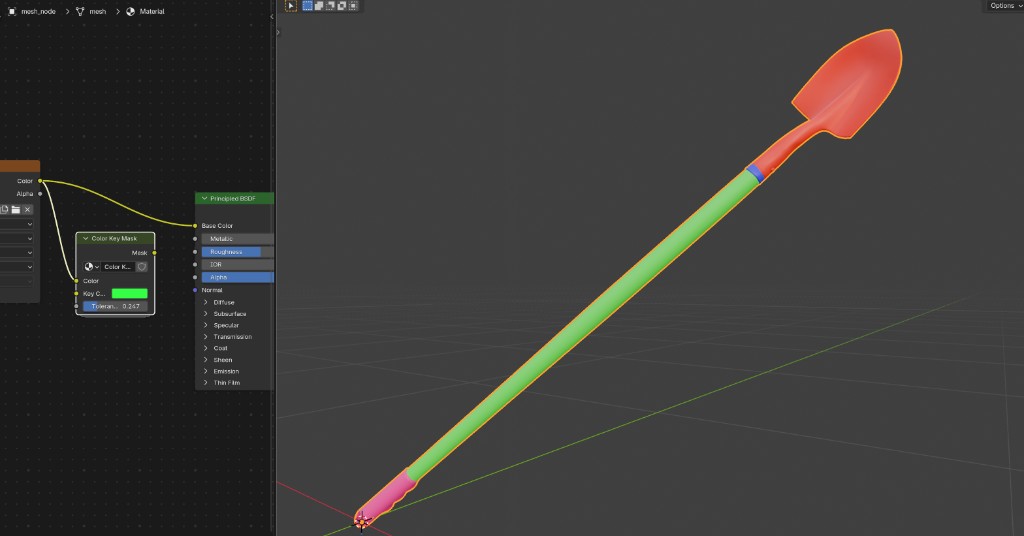
A free Blender node group. Pick a color in your node network and get a clean black and white mask out.
Go to download ↓Color Key Mask is a single node group for Blender. Drop it into your network, pick the color you want to isolate, and it outputs a clean black and white mask of everything that matches.
There's a tolerance slider to control how close a color has to be to count. Keep it low to grab one exact shade, or raise it to pull in nearby colors too. Great for masking painted regions, ID maps, vertex colors, or anything you've keyed by color.
It's free. Hit download, then in Blender go to File then Append, open ColorKeyMask.blend, and grab the node group. Enjoy!

I’ve been using Blender since 2008, worked as a 3D department manager, and was a producer for the Blender Guru YouTube channel. These days I build the models, tools, and training you’ll find here. Your Site Pass helps me keep making them.
More about me
Comments
Sign in with a free account to join the conversation.